There. I’ve said it and I mean it.
Their products, when they work, do work fine. But when something goes wrong, you can’t count on support. So I’m steering clear of their devices AND their support, and I’m sharing my feelings in this on my blog.
Here’s the rant (quite a long read, got a lot to get out of my system) :
Devolo support seems to consist entirely of first-level support people that only know how to provide support by sending you a pdf with ‘things you can try’. At no stage did I feel that I reached second-level support or that I talked with someone that actually *read* my emails and asked me further technical info based on previous emails.
The overall feeling I got from the emails was that they wanted to get rid of me, but didn’t know how or that they were obliged to follow the rules, i.e. always respond to a customer request, even if it is to resend the same pdf with the same info you sent previously.
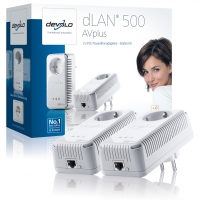
As you can read in my other blog posts, last year, about 7 months ago I needed a solution for routing my ethernet signal to my new work room on the first floor. Having used Devolo Dlan Duo devices before without any problem whatsoever I went out and bought 3 Devolo DLAN AV500 devices : 2 with just one ethernet port, 1 with 3 ethernet ports for the various devices (even my TV now has an ethernet port).
From the start, something went wrong with the device that was connected to the router. Every so often it would hang and I would need to go downstairs and unplug and replug it. Then it would work again. Later I found out that it’s actually the ethernet port itself that shuts down, it can still be reached via the power connection so you can actually do a reset from the DLAN cockpit software without needing to unplug it.
So to restate the fact :
- The device works, and works fast, no slowdowns, no short dropouts, it just works
- Suddenly it stops working, usually when transferring a large amount of data
- You ‘reboot’ it and it works again, just as fast as before
- It will -days or hours- later suddenly stop working again
- See 3…
This didn’t look to me as a typical hardware problem : it’s solved when you restart the device or reset it to factory settings. To me, it looks like a software problem, one or other counter is going haywire and a reset is needed.
So I contacted Devolo support via email in October 2012, and began a very long email back-and-from conversation that lasted until last month June 2013. To be honest, there were usually a few weeks between the answers what with work and family, so not every day a mail was sent.
I also wrote 2 blog posts about this problem that got quite a bit of reaction from other people who are having a similar problem. At the moment I’m writing this, at least 20 people have expressed that they are having the same problem. There have been 1172 visits to that particular blog post already, and unless they do something to fix their product it will only go up.
In the end, after numerous tests (update of the firmware to the latest dev build then, plugging 2 devolo’s in one extension cord to see if they have a good connection, having to confirm and reconfirm and then again reconfirm that no there is no slowdown AT ALL, switching one device in for the other) Devolo software support decided that my device had a hardware fault, based on the fact that when it crashed, there is no visible indication that it has done so. And then it told me to sort it out myself by going back to the shop and asking for an exchange.
Tell me how YOU can explain to a shop attendant that you want to exchange the device because it is faulty when it shows NO VISIBLE indication that it is faulty ? I don’t know about shop attendants in your country, but the ones I know in Belgium are quite aloof and suspicious when you want to return hardware after 7 months of use.
I have several times told Devolo support that I am not the only one with the problem, please see my blog and read the comments. At no time did they respond to this. Probably because then they might have to actually investigate it, spending time and resources to actually solve the problem for everybody affected.
In the end I bought a new device to replace the Devolo DLAN 500AV+ but this time a Powerline device from D-LINK. Since both the devices use the same common “Homeplug” standard, they just recognise each other and start working together immediately together.
Problem solved, at my expense of course. But at the expense in the long run of Devolo as well. I’m no longer a customer of theirs, will buy other devices than Devolo, and I am making the world know of this so other people know what happened.