Archive for the ‘Hardware’ Category

RFID firewalls are here !

Thursday, May 3rd, 2007

Today I read an Ars Technica article about a new protection for your RFID tags (you know, those tags that are now used for taking stock of inventory, theft protection, and are now showing up in passports).

What great about this new protection is that you can configure which tags you want to allow to be queried – you can even select trusted readers, for example if you have an RFID chip in your card that allows you access to your work building, you can allow that reader to query that tag, but no others.

So far it’s still in development, but if and/or when RFIDs become more and more pervasive, this will come in useful.

Using RFID to configure your wireless network

Thursday, March 15th, 2007

Apple has gotten a bright idea (and patented it right away too) : put a Radio Frequency ID (RFID) chip in your networking device, and bring them in close proximity to each other.

They’ll recognise each other, and can then configure the rest of the wireless network setup themselves : an extract from the MacRumors site :

The system describes using RFID tags in networking equipment that would communicate basic configuration settings when the devices got close to one another. The devices would then be able to establish a rudimentary network based on that information and be able to automatically finish setting up a more complex and secure wireless network.

Personally, I think it’s a damn cool idea, one of those “slap-your-forehead and wonder why nobody thought of this before” ideas…

I can already see it before me : you’ve bought a new laptop, you come home and unbox it, and bring it close to your router during the network setup. They see it each other and immediately set themselves up using the correct protocols and keys.

Still, two things need to be cleared up : one, RFID chips in their current state are notoriously unsecure, so Apple will need to secure them in one way or another, and two, there has to be a mechanism to agree on the router that you want to add a new client (a button to press ?).

Busy with my new mac

Friday, December 15th, 2006

I don’t have too much time right now.

I’m busy migrating my content from my mac mini to my new iMac, plus dual-booting into Windows XP to get a good dose of the latest graphical games there.
It’s a swweeeet beast… Guess which one I have ?

Ok, ok, for my own benefit (I just realised I use my own blog to find the hardware details of my stuff) :

Imac 24 inch consisting of an Intel Core Duo 2 (2.16 Ghz) , 2GB ram, 500 GB harddisk, Nvidia 7600 GT (256 MB Ram), AppleCare protection for 3 years).

Getting online with your PSP if you use WEP

Saturday, December 2nd, 2006

I’ve had to use WEP security for my wireless setup as I am working with a WDS setup.

This was needed so my DVD-HD Kiss Player, connected to an Airport Express, can get to the internet and download his program tv guide. And WDS only works with WEP… sigh. Otherwise I would be using WPA pre-shared key, which is much more secure and which the psp also supports.

Anyway, if for one reason or the other you do need to set up WEP, please use the 128 bit kind and set up mac filtering – the 64 bit key can be broken in the space of a few hours !

A few reminders (for you and for me) :

  • your psp can only use 802.11 B networks (it confused me though, that it can see the access point even when it is only in G mode… must be a different protocol or some such)
  • when using WEP, it is best to type in the actual WEP key and not the password that generates the key (the password is the one that you typed in your router to set up wireless wep security). For the 128 bit key you need to type in 26 digits.

Instant lust : the E-ten Glofiish M700

Monday, November 20th, 2006

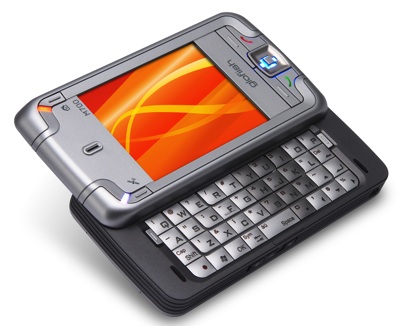
Glofiish M700
I just saw my new dreamphone: the E-ten glofiish M700. It’s got everything but the kitchen sink :

quad-band GSM/GPRS/EDGE connectivity, Bluetooth, 802.11b/g Wi-Fi, GPS (SiRFstar III) with TMC, an FM radio, an integrated camera, and Windows Mobile 5.0, the M700 has the added bonus of a slide-out QWERTY keyboard. No 3G support, it seems, but it still looks like a great all-in-one device.

It is supposed to be available before the start of the XMAS shopping season : somewhere in November…

Setting up WDS between a Linksys WRT54G and Airport Express

Friday, October 20th, 2006

Last monday I bought myself an Apple Airport Express (AX), which I want to set up as a Wireless extender for my current wireless netwerk so that I can connect my KISSDVD/HD recorder (a 200 GB DP-558) to the internet and so I can access the Electronic Program Guide Kiss provides on the internet.

I can very easely set up the AX as a client to join the network, with WPA or even WPA2 security. But this disables the ethernet port on it (I don’t really understand why it disables it though, except to prevent double connections), which is exactly what I need it for.

Thursday night, after a lot of struggling I finally got it to work.

For (my) further reference, here’s how to set up a WDS netwerk between a WRT54G and an Airport Express :
- on my linksys WRT54G, I use dd-wrt 2.3 SP2
- WDS is configured with the wireless mac of the Airport Express in the Linksys and the wireless mac of the linksys (there are at least 3 macs !) in the AX.
- Lazy WDS and Loopback are off
- Using WEP : create the WEP key on your linksys, but on the mac clients you need to enter in the password box NOT THE PASSWORD BUT THE HEX KEY !! You don’t need to do this with WPA, there you can use the password, but since WDS at the moment only accepts WEP encryption…
- With the later firmwares, since at least 2005 you NO LONGER need to input the fricking $ anymore ! I wish people would update their posts, because this is now causing a lot of confusion.

Extra Links :

2-port KVM switch

Monday, September 4th, 2006

Belkin SwitchI have needed a KVM switch (Keyboard, Video, Monitor switch) for some time now, as it has become bothersome to switch between my pc and my mac every time.

Sure, I did install ultra-vnc on my pc, so I could fire up Chicken of VNC and get to my pc using my Mac’s screen and use it for simple tasks like Active Sync and Word processing, and it does that Very Well.
But it doesn’t show very good video and it goes haywire when you want play games, even simple ones. And my son is asking more and more to play a game on our pc so I am spending more and more time switching cables.

So I set out to find a solution that was compatible with mac and pc. As previously mentioned, I already looked a solution made by Belkin, but at the time it wasn’t out yet.

This time it was available, but not the specific mac-intel version.

I could either buy a Switch2 solution that fit under the mac mini, with no sound replication and which costs more than 110 € in the Fnac (although you can find it online lots cheaper), or I could buy the regular Belkin 2-port KVM Swith, with built-in Audio sharing (F1DL102Uea) and a max resolution of 2048×1536 for about 65 €.

After lots of comparing and running between the two product stands, I chose the latter, because
a) it was cheaper and
b) it included audio as well
It also claimed compatibility with Mac OS X. And while Belking makes a lot of noise about their latest Switch2 version for mac to be the only one that can deal with a Mac keyboard, this version has no problems with it as well – when I switch to my Windows XP, my Apple keys become Windows keys, and vice versa.

So, this solves my switch problems. All I need now is a new pc.

I’ve been mulling about buying a new iMac with built-in screen, but with lots of extra costs on our house coming up, the cheaper solution will be to continue using my mac mini and buying a new, higher performance pc. For about 1000 € you can get a more than reasonable top-of-the-line pc while a similar iMac with same memory costs close to double (of course, the screen is not included in the regular pc, but nowadays the price difference shouldn’t be that big).

Hmm. I’ll wait a bit more, see if there are any new updates to the iMac line that make it worthwhile to choose it.

Qtek 9100

Sunday, July 30th, 2006

Qtek 9100
I am the proud owner of a Qtek 9100 pda-phone now !

It’s a pda with phone capabilities that has Windows Mobile 5 phone edition, AKU2, so the latest version and is a quad-band phone that can do GSM, GPRS and EDGE.

At first I wanted to buy the new Tytn from HTC (also the makers of the Qtek, they’ve just rebranded them), but since that phone is about 200 € more expensive, I’ve decided to take last years model, which just had taken a serious price cut (589 € for the UK version instead of 699 € at the local Fnac). As I am on a dual subscription (work/home) I only use my phone for talking and texting via GSM and wireless with my PDA for everything else, so this makes sense for me.

The advantages of the new Tytn are a more powerfull cpu, video conferencing if you have the right dataphone connection, ready-made for the HSDPA protocol via firmware update, and the addition of a jog wheel to let the user more easely operate the phone one-handed.
I think the only thing I’ll be missing will be the jog-dial, and depending on the number of applications installed or used, the enhanced cpu.

The whole setup came in a nice box which included a remote headset (cable) and a belt-clipped case to put the phone in.

So far, my impressions are favourable – the phone seems stable (my biggest fear is that WM5 will crash when I desperately need to phone) and I’ve installed my normal applications (ListPro, pRSSReader, a password list) and they work just fine.

The screen is QVGA and smaller than my iPaq hx2410, but it seems the pixels are more tightly packed together, resulting in a very fine screen. Already I find the screen of my iPaq to be ‘flat’ and pixelated, while before I didn’t see this.

The slide-out keyboard takes some getting used to, but it seems to work fine if you use your thumbs, and responding to an sms is easier that way.

One thing that is hard to find is where you can download updates for your Qtek from : this is from the local Belgium importer, which I found out is Smart-Phones. You’ll need your IMEI number from your Qtek phone to login and be able to download the latest updates. I checked and it was already at the latest version (which I suspected as it had the WM5 AKU2 update).

As for Qtek forums : the one in NL (forum.qtek.nl) is at the top of the google list, but ofcourse you need to register to even see it, and since I have a Belgian IMEI, I can’t.

I will try to re-sell my iPaq on Ebay to recoup some of the investment.

How to reset a WM5 HP iPaq device.

Tuesday, June 13th, 2006

You hope you never have to use it, but it’s damn convenient to have noted the html page when you do need it.

That secondary problem of the empty programs list is a real hard one. There are several people who have had similar problems, but there doesn’t appear to be a solution for it.

Hard Reset, then try to restore all… pffrt.

To perform a clean reset and return your HP iPAQ to factory settings:
1. Press and hold the Calendar, Power, and Messaging buttons.
2. While holding down these buttons, use the stylus to lightly press the Reset button on the bottom of the HP iPAQ until the device restarts.
3. When the HP iPAQ restarts, release all of the buttons, and then remove the stylus from the Reset button.
The HP iPAQ restarts and powers on.

Active Sync Woes : use a Bluetooth connection !

Thursday, May 18th, 2006

I’ve had it with the irregular, unresponsive, plug-and-pray manner that Active Sync and Microsoft in general work with USB connections to PocketPC’s. Either it’s Active Sync not syncing or ‘Unknown USB device’ for my cable, it’s just gone on too long.

And I’m not the only one – I’ve read several comments over the last few days that people are getting fed up.

After all my troubles trying to get my Active Sync USB connection going again, removing and reinstalling AS and USB drivers, even going so far as to install AS beta 4.2, I still could not get a connection. So I went the other route and bought a PEABIRD bluetooth usb module.

It was actually 0.50 € cheaper in the FNAC than the D-Link BT120 module which I knew about, plus it promised EDR – Bluetooth 2.0 instead of regular 1.1 Bluetooth that D-Link offers.

After the Toshiba drivers and utilities are installed, setting up Active Sync was a snap (well, almost). I first put both devices discoverable, paired the devices (for some reason or another, the only way that pairing works well for me is when I start the pair process from the pocket pc), and then discovered the services that were offered on each and created the relevant shortcuts for them, both on the pc and on the ppc.

Once that was done, I then set up an Active Stink, sorry Sync connection choosing to use Bluetooth to sync.

To get an actual sync working, I have to do the following steps :
1. Start Bluetooth serial connection on the pc (it has attributed itself COM40 !) using the shortcut it created.
2. Start AS on my pocketpc (making sure that Bluetooth is active)
3. Click the Sync button

and voila ! Sync auto-starts and everything works just fine.

Speed of sync is fine, although I suspect that my pc is only BT1.1 capable, it still works reasonably fast. I set both Bluetooth services back to non-discoverable again, plus only paired devices can connect. This should give some security.

All in all, it slightly more work starting the Sync, but so far all my Sync attempts have worked first time. No more install and re-install hassle (let’s hope so).

Archives
Search this blog
My Webhost