Archive for the ‘Hardware’ Category

iPad.

Thursday, August 19th, 2010

Well, I’ve just returned from a 10 day trip or so around Nord-Pas-de-Calais, France, and for once I didn’t take the laptop with me. Instead I brought my iPad along, and it served very well as a light-weight replacement ‘entertainment device’.

No programming at all, just consuming lots of different media, for which the iPad is more than up to it.

I watched a few movies on it using the Videos app, read a book using the Kindle iPad edition, and some comics on it via Comixology, and kept some spending figures in a spreadsheet using Numbers. I also used it a lot with Offmaps, an offline map reader for which I had downloaded the appropriate openstreetmap part of france before I left. It’s no match for a gps, but coupled with the GPS that is in the iPad it’s like map reading with the added ability of seeing where you are and zooming in and out of the map as you please. I really hate those small screens of the current gps devices, it’s so hard to get an overview of where you are going, with the iPad it’s just natural !

One thing I do miss is that I can’t download new pictures out of my camera like I do using the laptop with the SD Card reader although I believe there is a camera connection kit on the market.

The next few trips will also have an iPad as long as I don’t have to do any programming…

Gardena Accu Lawn mower – first impressions.

Friday, July 9th, 2010


I had my old “Greenway” electric lawn mower for over 10 years now, and it did it’s job, but it was time to get something that was a bit less hard to work and wrestle with.

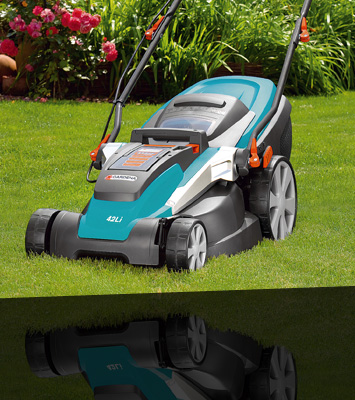
So I recently replaced it with a Gardena Accu Lawn mower – no more wires to cut accidently through, a lithium-ion battery that does not run down over the years, and a very functional design that allows you to raise or lower the mower with just one toggle. Plus a manual that is well written and if you follow the instructions correctly, it’ll have you up and running in no time. It’s very refreshing to read a manual that’s exact and knows what it is trying to explain and does it so well !

All in all, a difference of night and day. I do have two issues though:

One: The Battery.
Today, in hot weather of more than 30 degrees, I decided to cut my lawn using the mulch function of the mower. Previously I could cut more than half of the surface of my lawn with the one battery, and since it is divided into 2 already, I didn’t mind. And the battery lasted about 40 to 50 minutes.

But now, the battery ran down after just 20 to 30 minutes, even before I could finish one half of my lawn !!!

And since I have only the one battery, I’m done for the day. Charging times are 7 hours or so to fully top them up, so I put my lawn mower back into the shed.

I knew that I would have to buy another battery to be safe for future years and do my lawn in one go, but this is just ridiculous ! I hope it’s the heat that made the battery less performing, but it was a serious disappointment !

Two: The fail-safe handles.
The handles have a button you need to press and on both sides, a lever you need to pull out, preventing accidental startups of the machine. I totally get this. But do those handles need to be so tight ? My hands are in continual cramps of clutching those 2 handles all the time. They are so damn fiddly, you need to press really hard on them to prevent an instant stop.

Apart from that, a wonderful machine.

My HD Recorder KISS DP-558 is dead. So is the Kiss website.

Sunday, December 27th, 2009

Kiss Technology is dead

After 4 years of usage, my Kiss DP-558 recorder is dead. Done. No longer working. And the Kiss website is down as well. Cisco/Linksys has taken over and shut down Kiss Technologies. More’s a pity that they never *did* anything with what they bought…

A mains current failure that came and went made sure that it died an agonizing death, always switching on and then switching off again. I’m sorry to see you go mate, you earned the ‘wife-acceptance’ trophy, which is hard to come by.

So I’m looking for a replacement. I’ve finally settled on a Emtec S800 (I originally bought the S800H, but this only has a digital tuner, not an analog, and we’re still (stubbornly) analog.

Still, no more Electronic Program Guide to pick and choose from. And still no H.264 (which the S800H did have) codec support. And no more having something decent looking under your televison that fitted in with the Hi-Fi equipment.

Bummer.

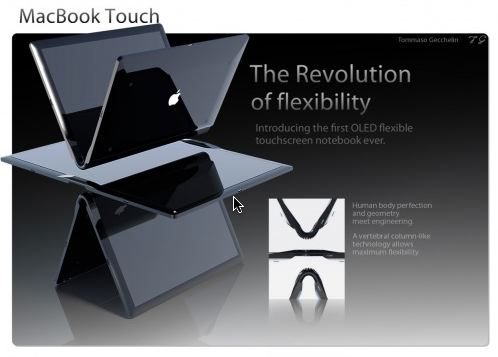
The MacBook Touch (mockup)

Friday, November 27th, 2009

Yep. This is droolworthy.

MacBookTouch

Shiny Stuff: Sony Reader PRS-505

Saturday, November 7th, 2009

After more than a year of watching it go for the same price on Ebay without the price dropping, I finally cracked and bought me a Sony Ebook Reader, model PRS-505. The day after I ordered, Jeff Bezos from Amazon announces that the Kindle is now available worldwide for the price of about 200 euros, about the same price I bought my reader from Ebay. Not sure if I am happy about that or not.

Perhaps happy – maybe there will be more english books available to buy on our side of the ocean ? Sometimes I want to buy an ebook and get a refusal. Something to do with rights that can be sold seperately on either side of the ocean… and this is sometimes not done on both sides, or at the same time, so only one side of the ocean is served, so to speak.

Very frustrating, that is: seeing an ebook you want to buy in the eshop, wanting to buy that ebook and not being able to buy the frickin digital file.

First impressions of my Sony PRS-505: it’s small, and fairly heavy. It’s got a Sony memory stick reader, but also a SD card slot. Guess which card is cheaper to buy ? You guessed right, the SD card. I slotted in a 2GB card.

The buttons on the side are functional, but hard to press. But the e-ink page is phenomenal !

Once you get over the page refresh blackout (every time you change a page, the screen refreshes) it’s a delight to read. The e-ink paper is very sharp and clear. It charges over USB. So far I read a few hundred pages, and the battery level hasn’t even budged !

Using Calibre, a cross-platform ebook manager, I can organise my ebooks on my computer, and then transfer the one I want to read to my Sony ebook.

So far, so good. I’ve been taking it along on road trips and short vacations, and it’s holding up well.

EyeTV Elgato USB Device 1.1 error

Tuesday, September 15th, 2009

EyeTV 3 is complaining when I plug in the Elgato EyeTV Hybrid device that my USB port is 1.1 and it’s needs a 2.0 device to operate.

Apparently this is a common problem for Elgato EyeTV hybrid devices, although EyeTV wants it to be called a ‘rare’ problem.

But! The fix is here! Apparently for most devices, you just have to ‘cook’ it. In other words, to (temporarely) get it working again, you need to get it warm again.

Several solutions have been proposed in this Elgato support forum, and I won’t keep you from a few:

  • stick the usb ‘stick’ between your chair and your bottom for a few minutes
  • put it in the oven for a few seconds or minutes on low temps (I would NOT recommend this)
  • put it on an external harddrive that gets hot (like for example, oooeh I don’t know, an Apple TimeCapsule ?)

Anyway, after warming it a bit on my TimeCapsule, it worked like a charm ! Elgato recognises the device again, and since my iMac hardly ever shuts down, this should keep going until the next reboot or so.

Kiss DP-558 power supply error message

Thursday, September 18th, 2008

A year or 3 ago I bought an advanced hard disk recorder from Kiss-Technologies (a danish firm, since then bought by Linksys who in turn have been bought by Cisco). It can do things most recorders nowadays still won’t do, and do it quietly.

  • Electronic Program Guide (EPG) when connected to the internet. For this, normally you would need a digital tv decoder and the flexview or whatever it is called. I can just select on the tv screen what I or the wife want recorded and voila! it is set. No more entering start and end times.
  • FTP access : I can store other media like avi’s or mp3 on the copious 200GB hard disk.
  • Plays DVD’s too.

All the above can be found, but usually you need to buy both a dvd player and a media player to get that functionality.

The problem of those marvellous machines however, is that they are no longer made (which is a damn shame), and the power supply was custom made, and used bad transistors. It is stated that within 3 years of purchase, the psu will fail. Most of the time, it’s just the power supply.

This was wat happened to us 10 days or so ago. It would just display ‘KISS DVD’ on bootup and no longer allow me to eject the cd.

I scoured the MPCC bulletin board, which specialises in media players or all kinds and found out that this message is the sign the psu has broken down.

Lucky for me, I found a reference to a small website called osCommerce run by Kim Tapdrup that specialises in repairing KISS DP power supplies. Either you can ask them to sent you the transistors and you do it yourself, or you can sent it to them for repair (they no longer sell the original power supplies, since those are out of stock). A repair costs around 40 to 50 euros post and packin included.

So I figured : what the heck, why not try it, and I paid for the repair and sent him the power supply from the DP-558 securely wrapped (it’s real easy to remove, since it is installed on a separate print plate).

And today a priority package from Danmark arrived ! I installed the psu again and lo! and behold! our beloved KISS DP-558 is working again. I’m hoping those new transistors will keep it humming for quite some more years !

So a big thanks to Kim Tapdrup for still running these repair services after all these years and being so prompt in repairing it !

Macbook Air costs 1699 euros in Europe, 1799 dollars in the States

Wednesday, January 16th, 2008

Buying a Macbook Air in Europe costs 1699 euros. Converted to dollars you pay 2499 dollars instead of 1799 dollars if you bought it in the States. A price difference of 600 dollars !!

Conclusion : Europe is richer than America.

No more external sound from your iPhone ?

Monday, December 17th, 2007

In case you have the following problem scenario on your iPhone, here’s a quick tip :

  • sound via headphones, no sound via the speakers
  • your phone rings ok, but
  • everything else you can’t hear except via the headphones

Then you need to plug in-and-out your headphones. Go on, have some iPhone intercourse !

Do that about 3 to 6 times and normally it’ll start working again. I noticed that my audio output started working again when suddenly my ipod screen came up.

Connect your xbox 360 to your iMac using Elgato Eye Hybrid

Thursday, November 22nd, 2007

I’ve recently acquired an xbox 360 when MediaMarkt did a clearance sale on a particular package deal. 299 € is a very nice price for an xbox with a 20 gig hard disk, only the arcade version is selling cheaper.

I thought it was time to buy one, since almost all the games come out on xbox 360 nowadays, plus the fact that I really, really, really hate rebooting into Bootcamp Windows XP to play a game. All my Firefox sessions gone, all my open files needing to be closed and saved, closing my iMovie project… yes, my mac never shuts down unless it’s for a reboot for a new upgrade or into Bootcamp.

That’s the real power of the mac – it hardly ever crashes, so you keep everything open and keep working on stuff whenever you feel like it. :-)
So I got my Xbox 360, I’ve got an Elgato Hybrid USB stick, and that stick is connected to my iMac to record tv shows. Why not connect the xbox to my iMac via the Elgato Hybrid ? I first tried using the normal cinch cables, but the screen quality is really not good at all, and rather shaky to boot.

The trick to it is using a S-Video cable instead, and while it is not a super-crisp HDMI signal, it certainly makes it look better. It look goods enough to play every evening some Assasin’s Creed, in fact.

Without rebooting.

Archives
Search this blog
My Webhost